


Article updated by
Amanda
2 months 2 weeks ago
- 3 min read
How do I access my customer area after a card replacement?
11.4K
Share




Have you just replaced your Nickel card? Here’s how to log in to your customer area:
- Access your customer area:
- On the Nickel application for iPhone or Android.
- On the web: https://application.nickel.eu/
- Enter your new ten-digit ID, located on the back of your new Nickel card.
- Enter your usual 6-digit password.
Image
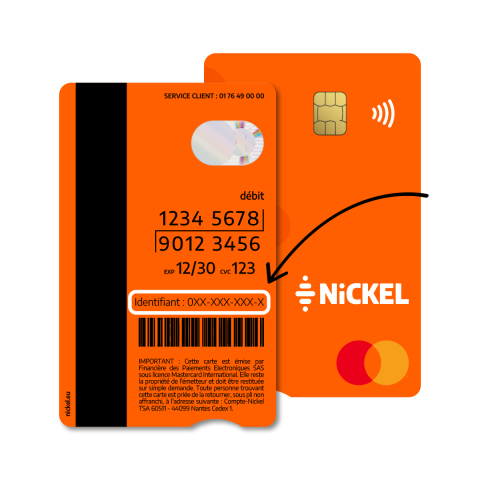
You are now logged in!
Remember to activate fingerprint or facial recognition login to easily access your customer area from your smartphone.
Share
Back to top
To follow the news of Nickel, join us on
Was this article helpful to you ?